
What is SAP E-Beyanname?
The core idea: declaration data, validation, approval, and GİB filing in one flow.
Read the guide →INTERACTIVE PRODUCT SIMULATION · SAP E-BEYANNAME · GİB INTEGRATION
The Fenikstech SAP E-Beyanname interactive simulation shows how SAP FI-based preparation, validation, internal approval, scope-based submission, and archiving could be combined in one workflow. The intended channel depends on declaration type, period, province/taxpayer, authorization, environment, and GİB’s rollout schedule.
The interactive simulation runs in your browser with sample 2026 data and performs no transaction in real SAP or GİB systems; no signup or installation is required.
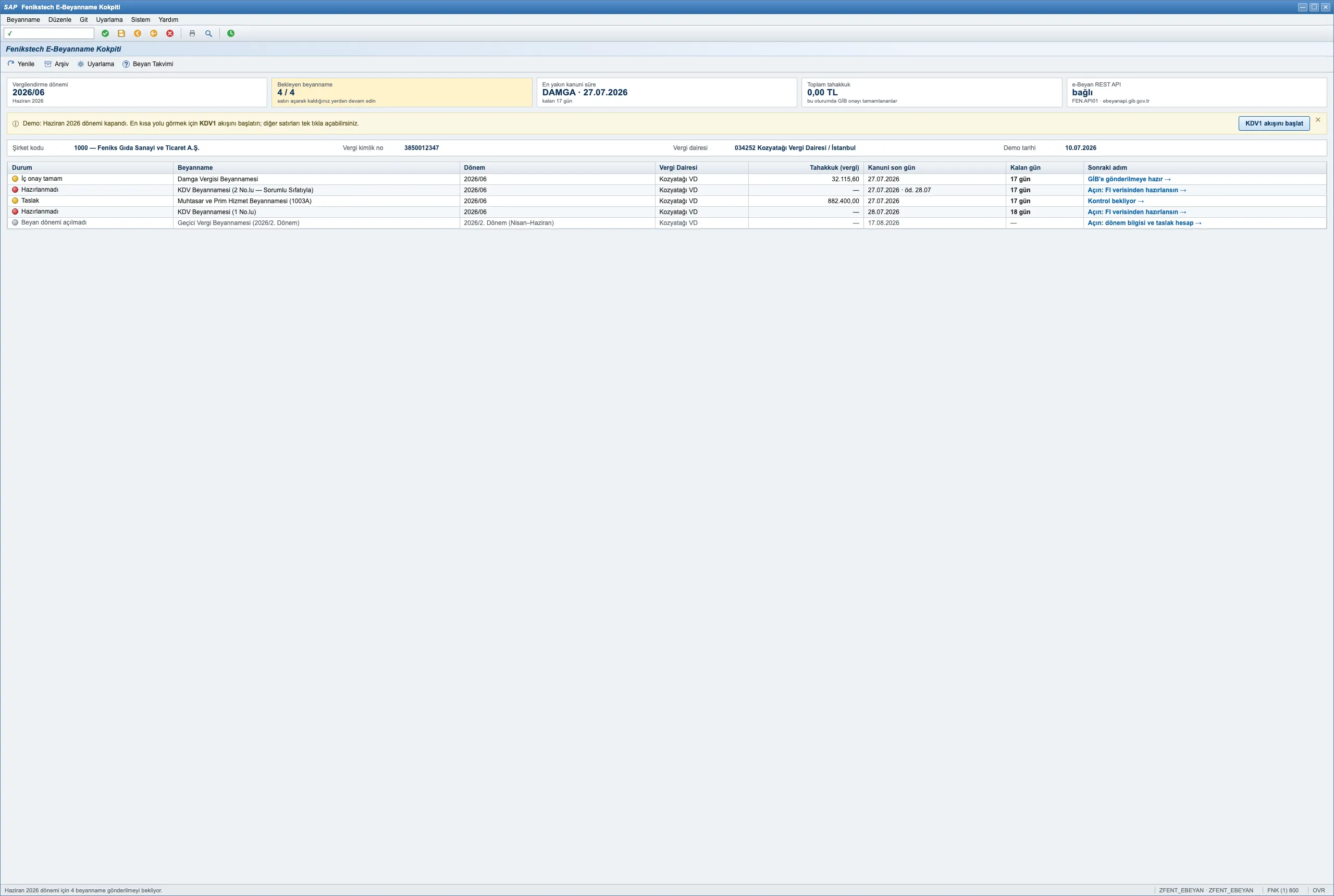
The simulation shows how preparation, validation, and status tracking for VAT, withholding and payroll tax, stamp duty, provisional corporate tax, and corporate income tax could be combined on one SAP screen.
The simulation shows how REST API or a supported package/XML flow could be selected by declaration, period, province/taxpayer, authorization, and environment, with each version kept on one channel.
In the simulation, tax-base and rate consistency, 191/391 account balances, carried-forward VAT, withholding thresholds, and payroll gaps are checked before approval. Blocking differences keep approval and submission unavailable until corrected.
The intended product approach versions GİB schema and validation changes; every live project would still verify current scope and company-specific scenarios before production use.
The simulation presents the preparer, approver, timestamp, declaration version, and submission channel in one process trail. Correction and special-approval drafts can start from the last approved version.
LIVE ERROR SCENARIO
A manual journal entry posted to the 191 VAT account without a tax code opens a TRY 14,250 gap between the ledger balance and the declaration. The control engine flags the difference with its source; internal approval and GİB submission remain blocked until it is corrected.
PRODUCT FLOW
Data from SAP FI and relevant sources populates the declaration. Tax-base and rate, 191/391 account balances, carried-forward VAT, withholding thresholds, and payroll gaps are checked down to the source record.
Maker and checker roles are separated, with user, timestamp, and declaration version added to the audit trail. REST API or a supported package/XML channel is selected by declaration, period, taxpayer authorization, and environment.
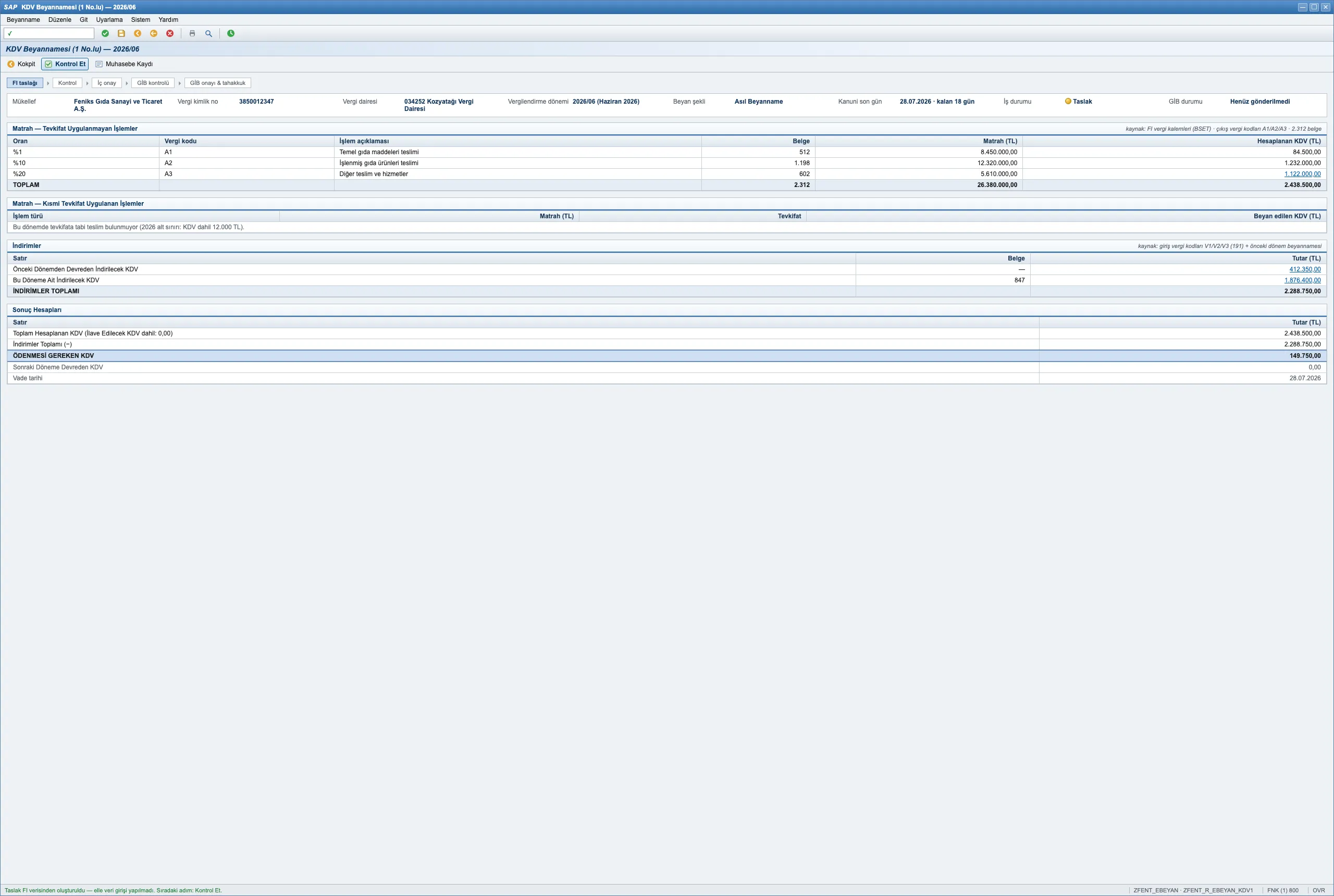
After formal approval, declaration and accrual documents are retrieved into SAP and the resulting FI clearing entry is previewed. A correction, late-filing, or voluntary-disclosure draft can start from the last approved version.
COMPARISON
Preparation, validation, submission, and archiving run as separate steps in the traditional process; Fenikstech E-Beyanname brings them into one flow inside SAP.
| Process / Feature | Traditional BDP & Excel | Fenikstech E-Beyanname Product |
|---|---|---|
| Data Source & Prep | SAP data is exported to spreadsheets, then declaration data is transferred again to BDP or the portal. | Declaration data is prepared from SAP FI and relevant payroll and tax sources with drill-down to the source record. |
| Pre-Filing Controls | Checks run across separate files and screens, making discrepancies slower to trace back to their source. | Tax-base, account balance, carried-forward VAT, and required-field checks run before internal approval. |
| Maker-Checker & Audit Trail | Preparer and approver details may be tracked through email, files, or separate task lists. | The preparer, approver, timestamp, declaration version, and status transitions are presented in one audit trail. |
| GİB Filing & Approval | Package creation, portal upload, and status tracking are handled as separate steps. | REST API or a supported package/XML channel is selected by declaration, period, taxpayer authorization, and environment, with status responses tracked in SAP. |
| Accruals & Archiving | Declaration and accrual documents may be stored in local folders or separate shared locations. | Approved declarations, accrual documents, FI clearing entries, and period archives are kept together inside SAP. |
| Corrections & Special Approval | Finding the last approved filing, identifying differences, and tracking explanations are handled in separate tools. | A correction draft starts from the last approved version, with late-filing and voluntary-disclosure options shown separately. |
| Multi-Company View | Separate files, screens, or tracking lists are used for each company and tax office. | Group-company declaration status, deadlines, blocking issues, and accrual amounts appear in one holding cockpit. |
| Regulatory Updates | When GİB changes a format or rule, the versions of each tool in the process must be tracked separately. | GİB schema and rule changes are handled as versioned rules; current GİB scope is verified for each project. |
ESTIMATED TIME SAVINGS
Enter your company count and declarations to see how many manual hours you save with in-SAP automation.
e.g., VAT 1, VAT 2, Withholding, Stamp, Corporate
* Results are estimates based only on your inputs. Actual savings vary by declaration type, validation scope, approval flow, and company structure.
IMPLEMENTATION GUIDES
Assess scope, architecture, and operations against GİB’s current integration documentation.
Sources last reviewed:
The core idea: declaration data, validation, approval, and GİB filing in one flow.
Read the guide →Separate the roles of the two channels and confirm when scope must be verified.
Read the guide →Assess support by declaration type, period, authorization, and GİB environment.
Read the guide →Design an auditable flow from SAP source data to GİB status responses.
Read the guide →Plan authorization, data, validation, testing, approval, and go-live.
Read the guide →Route technical and business-rule errors to their source, owner, and recheck.
Read the guide →FREQUENTLY ASKED QUESTIONS
Common questions regarding GİB e-Beyan REST API web service integration and SAP tax return filing workflows.
The Fenikstech SAP E-Beyanname experience on this page is an interactive product simulation. Using sample data, it shows how SAP FI-based preparation, validation, internal approval, scope-based submission, and archiving could be combined; it performs no transaction in real systems.
The solution can be configured for VAT 1 and VAT 2, Withholding and Payroll Tax (1003A/1003B), Stamp Duty, Corporate Provisional Tax, and Corporate Income Tax processes. The applicable GİB channel and detailed scope are confirmed at project start against the declaration type, period, taxpayer authorization, GİB rollout schedule, and the company’s requirements.
BDP is GİB’s desktop declaration preparation application. “Without BDP” means that users do not have to open BDP separately to re-enter data or prepare a package in supported workflows. The submission channel depends on the declaration type, period, taxpayer authorization, and GİB rollout schedule.
The solution can be implemented in SAP ECC 6.0 and SAP S/4HANA using native ABAP. The exact technical scope is confirmed after reviewing the installed SAP release, support package, company codes, and existing custom developments.
The company first submits an e-Beyan integration application through the Digital Tax Office and obtains GİB approval. Approved fixed IP addresses and an environment-specific API key are then configured securely in SAP. Available declarations and environments depend on GİB’s current rollout and the taxpayer’s authorization.
Tax-base and rate consistency, relevant account balances, carried-forward VAT, and required fields are checked before internal approval. Errors and warnings returned by GİB’s validation service are also shown in SAP, so they can be corrected before formal approval.
A correction draft starts from the last approved declaration while retaining the previous GİB ID, explanation, version, and process trail. Late-filing and voluntary-disclosure options are handled separately according to the fields required by the applicable declaration and GİB version.
The channel is determined by declaration type, period, taxpayer authorization, GİB rollout, and environment. The solution approach can use REST API where enabled and prepare a package/XML flow for other supported cases, while keeping each declaration on a single channel to prevent duplicate filing.
Clean, validated, deduplicated master data — loaded through the Migration Cockpit without weekend heroics.